.CUeYkqze_Z2syMAs.webp)
You often hear that standby power is expensive. Sometimes true, sometimes wildly overestimated. The only way to settle it: measure at your place, with your habits, your appliances, your tariff.
I ran a home audit with smart plugs and Home Assistant: power monitoring, history, identifying unnecessary periods. Within a few days, you quickly see what’s really hitting the bill… and what’s not worth spending time on.
In this article, I share the full method to replicate this approach: measure, prioritize, automate intelligently (schedules, thresholds, off-peak hours), and secure at-risk appliances (automatic cut-offs, safety guards).
🧰 My equipment: €60 to control everything
The plugs I use daily
I started like most people, with Tapo plugs. Simple, cheap, and it let me run my first tests without overthinking. Very quickly, it mainly taught me one thing: it’s not “home automation” that saves money, it’s measuring and controlling the right appliances.
Then I migrated to Zigbee. It’s a radio protocol designed for connected homes, with good stability and low power consumption. And above all, it integrates very well with Home Assistant.
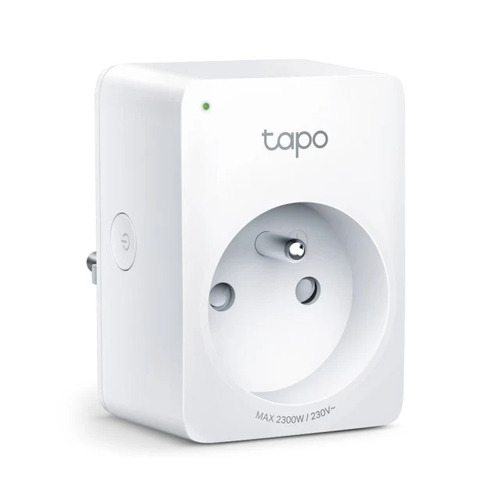
To measure and control what really matters without blowing the budget, I started with 4 Tapo P110 Wi-Fi plugs. Then I switched to 2 Sonoff S60ZBTPF Zigbee plugs, which I now prefer for one very simple reason: they’re ultra-compact (they don’t block the neighboring socket) and integrate perfectly with Home Assistant.
Tapo P110 Plugs (Wi-Fi) - 4 units
- Price: ~€10/unit
- Protocol: Wi-Fi 2.4 GHz
- Measurement: Instantaneous power (W), cumulative energy (kWh)
- HA integration: Native via Tapo component
- Big physical button: Very practical touch activation/deactivation
- Used for: TV, amplifier, food processor, home office workstation
Tapo P110 advantages:
| Advantages | Details |
|---|---|
| ✅ Immediate setup | Plug & play without a hub |
| ✅ Accessible physical button | Practical touch control |
| ✅ Functional standalone app | Convenient for the family |
| ✅ Accurate and reliable measurement | Clear consumption tracking |
Disadvantages:
| Disadvantages | Details |
|---|---|
| ❌ Bulky form factor | Can block the adjacent socket |
| ❌ Wi-Fi 2.4 GHz only | Loads the network with many plugs |
Sonoff S60ZBTPF Plugs (Zigbee) - 2 units
- Price: ~€10/unit
- Protocol: Zigbee 3.0
- Measurement: Power, energy, voltage, current
- Ultra-compact form factor: Doesn’t block neighboring sockets on a power strip
- Used for: Garage dehumidifier, office dehumidifier
.jpg)
Sonoff S60ZBTPF advantages:
| Advantages | Details |
|---|---|
| ✅ Minimal footprint | My #1 criterion now |
| ✅ Zigbee | Mesh network, no Wi-Fi overload |
| ✅ Complete and accurate measurement | Power, energy, voltage, current |
| ✅ Perfect HA integration | Zigbee2MQTT or ZHA |
| ✅ Physical button present and functional | Usable without an app |
💬 My advice: If I were starting over, I’d go 100% Sonoff S60ZBTPF for their compact form factor. On an office or kitchen power strip, they don’t block any other socket. It’s a small detail that makes a big difference day to day.
Note: the ”~€60” budget refers to the smart plugs. The humidity sensor (if you don’t already have one) is an optional addition.
🔎 Detecting appliances that consume unnecessarily
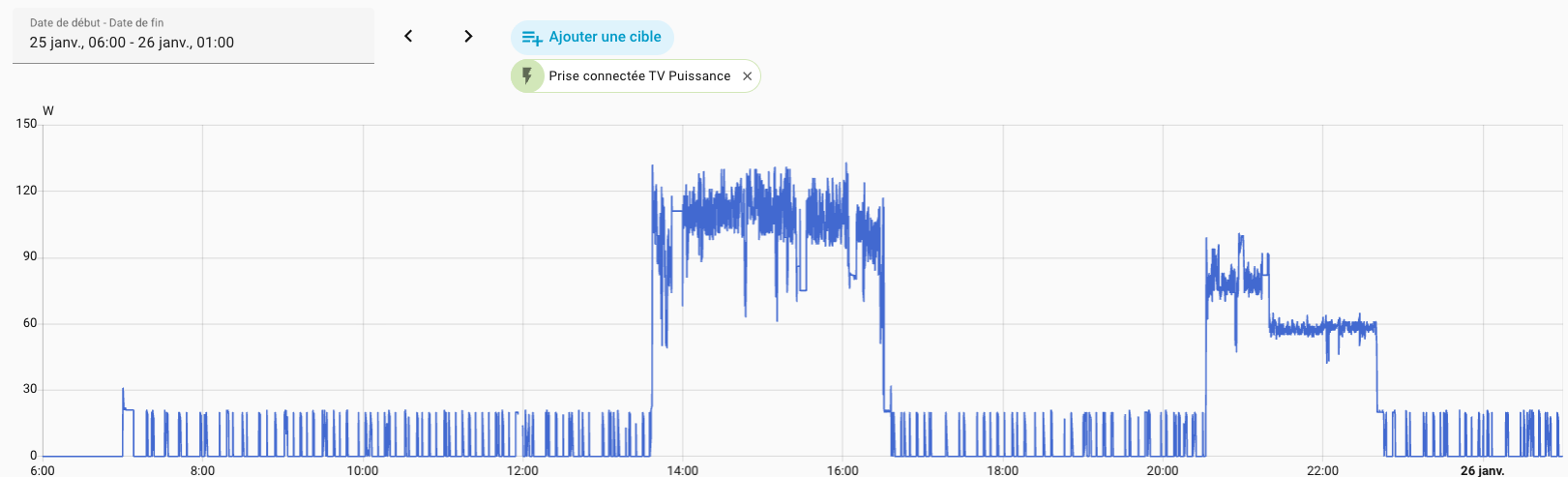
The 3-step audit method
Before automating anything, I spent 2 weeks measuring everything. Impossible to optimize without precise numbers.
Step 1: Install a smart plug on each suspect appliance
I targeted:
- Any appliance with a permanently lit LED
- Anything that stays plugged in 24/7 without continuous use
- Obvious high-consumption devices (space heater, dehumidifiers)
Step 2: Observe for 1 to 2 weeks
Home Assistant automatically records:
- Instantaneous consumption (W)
- Cumulative consumption (kWh)
- Real usage time slots
Step 3: Analyze and prioritize
I asked myself 3 questions for each appliance:
- How much does it consume on standby? (threshold: > 5W = priority target)
- How many hours per day is it on unnecessarily?
- What’s the annual cost in €? (calculation: kWh × €0.17)
⚠️ I deliberately excluded the internet router from this system. Cutting the internet would cut my security cameras, my push notifications and some automations. The theoretical €18/year saving isn’t worth the operational risk.
The culprits identified
Here’s the result of my audit, ranked by descending economic impact:
| Appliance | Consumption | Problem identified | Annual potential before optimization (estimate) |
|---|---|---|---|
| 🥇 Garage dehumidifier | 360W active | Unoptimized operation | €166 |
| 🥈 Office dehumidifier | 150W active | Time slots too wide | €75 |
| Food processor | 12W standby | Plugged in 23h/day unnecessarily | €17 |
| Home office workstation | 6W standby | On overnight on weekdays and weekends | €13 |
| Living room TV | 9W standby | On standby all day | €10 |
| NAD amplifier | 6W standby | Standby 17h/day | €6 |
This table identifies the big items (potential “before optimization”). The actual savings achieved are detailed below, after implementing automations.
What I learned about standby power
“Classic” standby (TV, amp, food processor, desk):
- Moderate individual impact: €6 to €17/year per appliance
- Total cumulative saving: €46/year for 4 appliances
- Simple solution: time schedules
Actively running but poorly controlled appliances (dehumidifiers in my case):
- Massive impact: €75 to €166/year per appliance
- Total cumulative saving: €192/year for 2 appliances
- Solution: intelligent schedules + off-peak optimization
✅ Conclusion: The big gains are in the big consumers, not hunting tiny standby draws. Prioritize appliances >100W before putting plugs on 2W standby devices.
⚙️ Optimizing consumption of energy-hungry appliances
Garage dehumidifier: intelligent scheduling
My starting situation
- Old house (1949) with a very damp garage
- Ambient humidity: ~80% (condensation and mould problem)
- 360W dehumidifier I knew was very power-hungry
- Random manual switching + a few forgotten switch-offs
My goal: Reach 76% humidity while minimizing consumption
The solution: a 6h/day schedule, aligned with the right moments
After a few days of measurements, I stopped “running it when I remember”. Instead, I created a simple plan: run the dehumidifier when it’s most useful, while making maximum use of off-peak hours.
The idea is twofold:
- Price: favor off-peak hours where possible.
- Efficiency: target periods when humidity naturally rises (night, morning, midday).
Schedule adopted:
- 10 pm → midnight (2h): off-peak hours + night humidity
- 4 am → 6 am (2h): off-peak hours + morning condensation
- Noon → 2 pm (2h): daytime humidity peak
That’s 6h/day, of which 4h during off-peak hours.
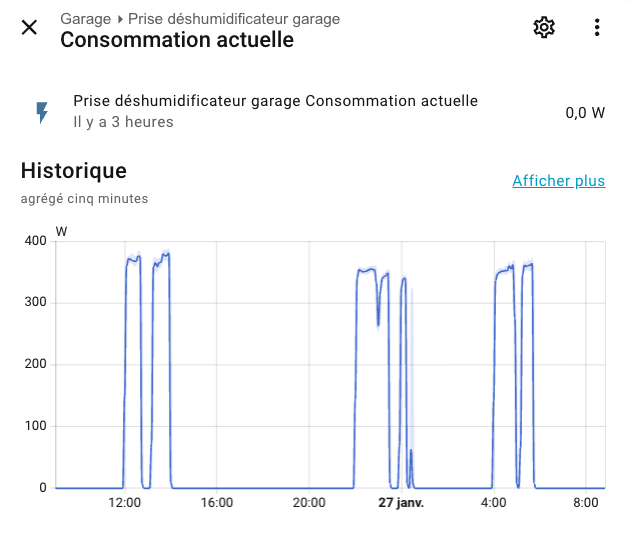
Results after 6 months
Maintaining this rhythm, I got a stable result, without thinking about it once:
- Estimated annual consumption: 788 kWh
- Of which 526 kWh during off-peak hours (so most at the best rate)
- Garage humidity stabilized: ~76% (goal achieved)
- Measured saving: €166/year
Office dehumidifier: humidity threshold control
My starting situation
- 150W dehumidifier with an imprecise internal sensor
- Too frequent or infrequent activations depending on the day
- Sometimes unnecessary cycles, so noise and consumption for nothing
The solution: external sensor + automation
Rather than trusting the built-in sensor (often poorly positioned and inaccurate), I externalized the measurement. I installed a Tapo T310 in the right spot, then let Home Assistant decide when action is really needed.
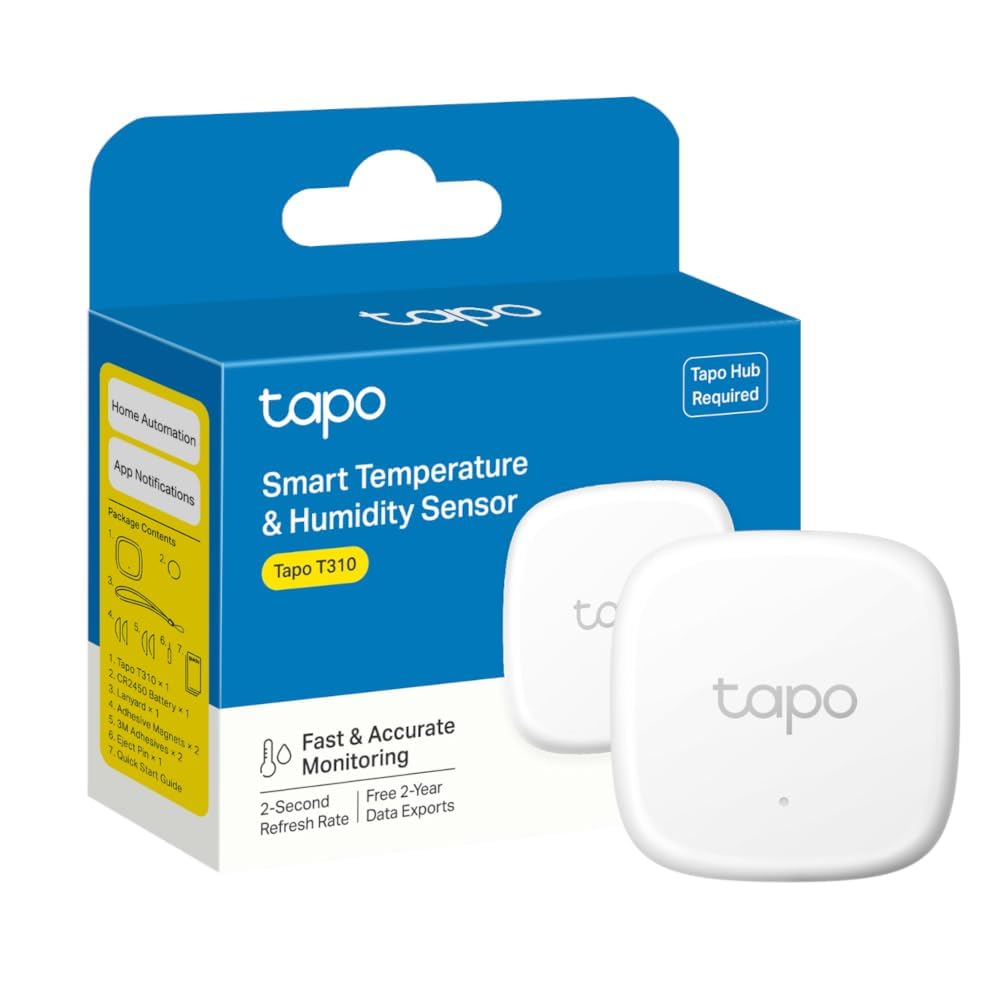
The goal is simple: dehumidify only when necessary, stop as soon as the level is back in range, and avoid running at night.
Applied configuration (what the automation actually does)
Start: the dehumidifier kicks in when humidity exceeds 60%.
Stop: it switches off as soon as humidity drops back below 60% (single threshold, intentionally simple).
Time slots: the automation is only active during defined time windows (several slots on weekdays, one broader slot on weekends). Goal: prevent it from running “for nothing” continuously.
Adjust as needed: if your schedule is different, just change the time windows — everything else stays the same.
Tip: if you notice too-frequent on/off cycling, you can add a delay or hysteresis (two thresholds). Here I chose simplicity.
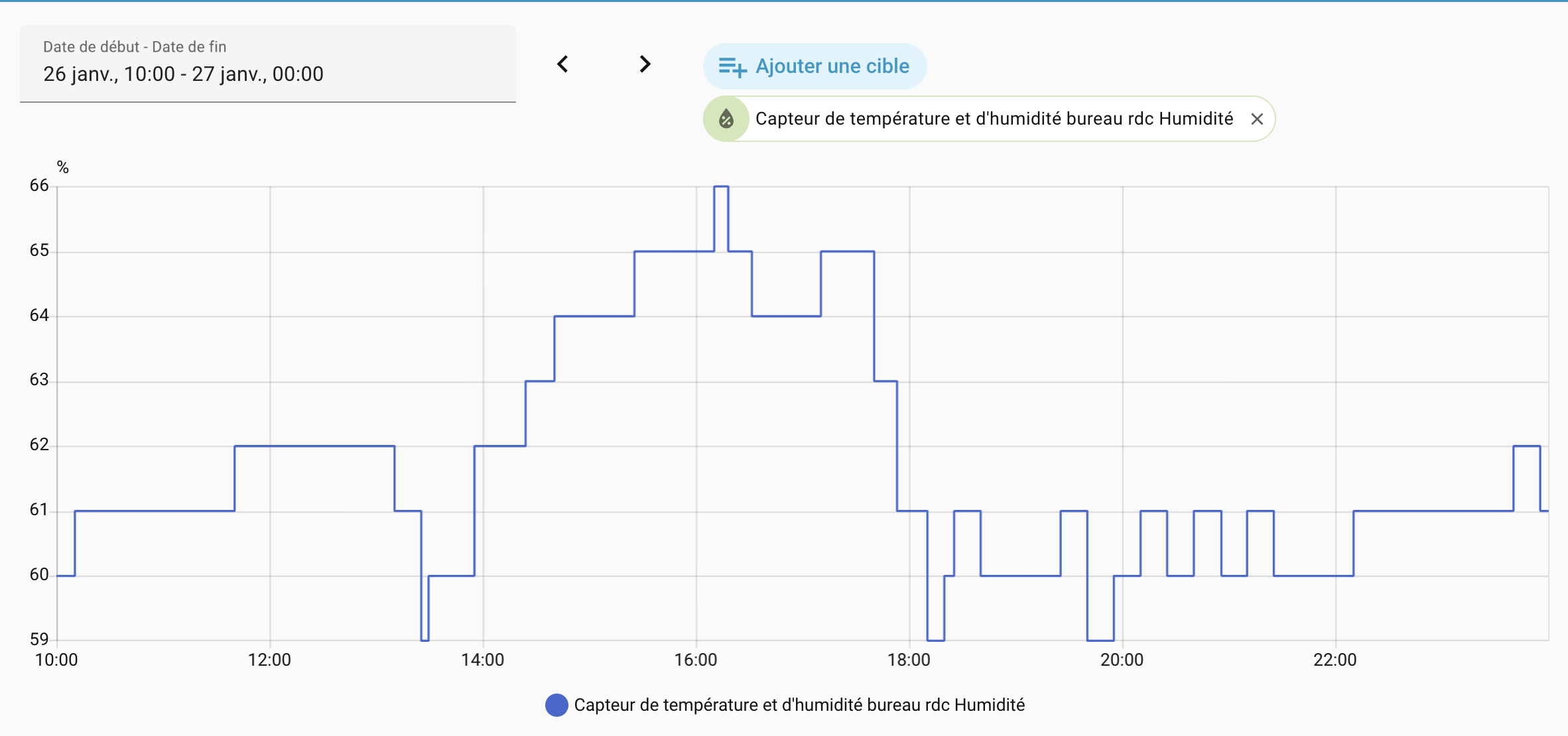
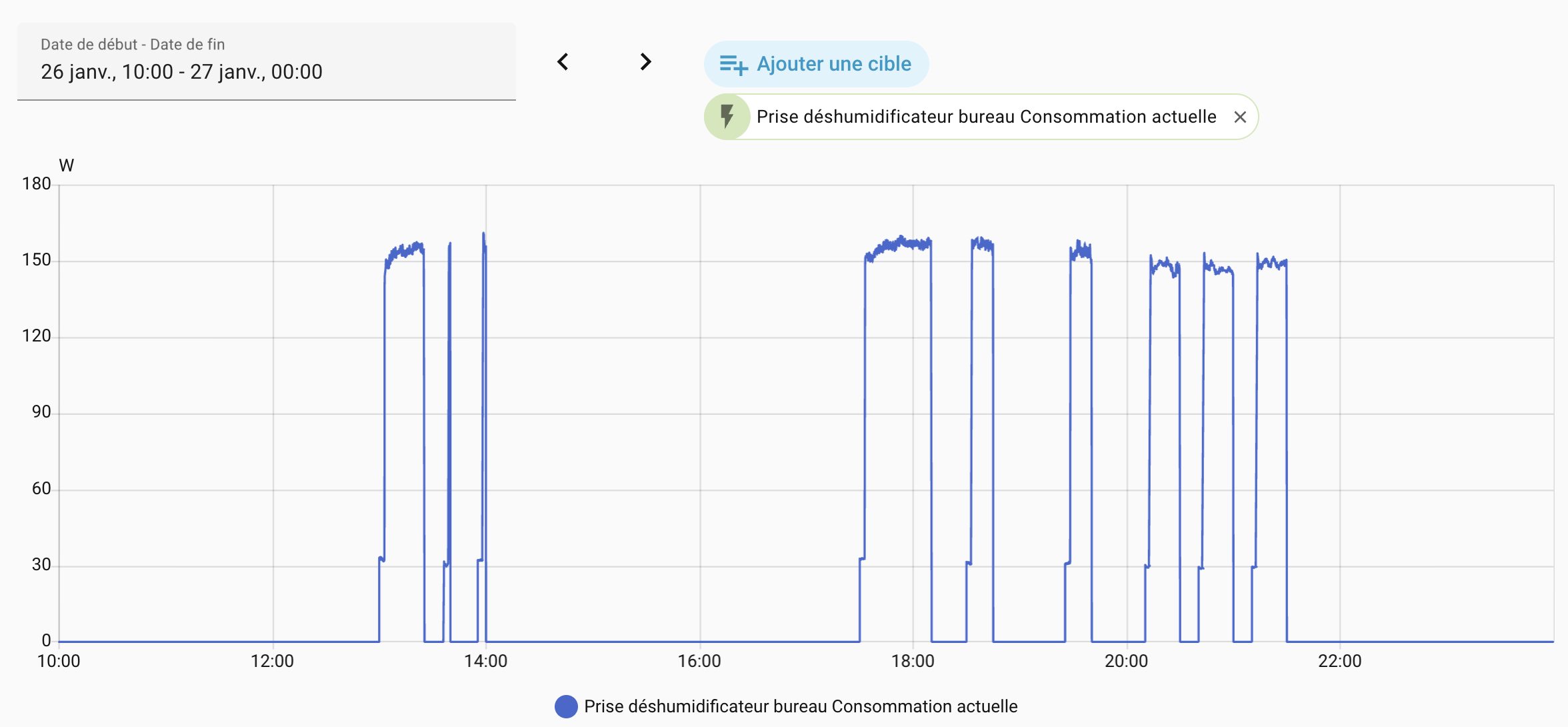
Results
- Variable operation depending on weather, controlled by defined time slots
- Humidity maintained around 60% (comfort zone)
- Measured saving: €26/year compared to the chaotic “run it when I remember” approach
The complete YAML automation
alias: Office Dehumidifier - Full management
triggers:
  - entity_id:
      - sensor.office_temperature_humidity_sensor
    above: 60
    trigger: numeric_state
  - entity_id:
      - sensor.office_temperature_humidity_sensor
    below: 60
    trigger: numeric_state
  - minutes: /5
    trigger: time_pattern
  - entity_id:
      - input_select.home_mode
    to: Holiday
    id: holiday_mode_activation
    trigger: state
conditions: []
actions:
  - choose:
      - alias: Turn on if humidity > 60% AND within a time slot AND compatible mode
        conditions:
          - condition: numeric_state
            entity_id: sensor.office_temperature_humidity_sensor
            above: 60
          - condition: not
            conditions:
              - condition: state
                entity_id: input_select.home_mode
                state: Holiday
          - condition: template
            value_template: |-
              {% if is_state('input_select.home_mode', 'Away') %}
                {{ (now() - states.input_select.home_mode.last_changed).total_seconds() < 1800 }}
              {% else %}
                true
              {% endif %}
          - condition: or
            conditions:
              - condition: and
                conditions:
                  - condition: time
                    weekday:
                      - mon
                      - tue
                      - wed
                      - thu
                      - fri
                  - condition: or
                    conditions:
                      - condition: time
                        after: "07:30:00"
                        before: "08:45:00"
                      - condition: time
                        after: "13:00:00"
                        before: "14:00:00"
                      - condition: time
                        after: "17:30:00"
                        before: "22:00:00"
              - condition: and
                conditions:
                  - condition: time
                    weekday:
                      - sat
                      - sun
                  - condition: time
                    after: "09:00:00"
                    before: "22:00:00"
        sequence:
          - target:
              entity_id: switch.office_dehumidifier
            action: switch.turn_on
    default:
      - target:
          entity_id: switch.office_dehumidifier
        action: switch.turn_off
mode: restart
📈 ROI: where smart plugs really pay off
Not all smart plugs pay back at the same rate. With standby power, you scratch away euros gradually. With energy-hungry appliances, the gain can be immediate because you avoid hours of unnecessary operation. Here’s the comparison, with real numbers.
| Category | Appliances concerned | Investment | Annual saving | Estimated ROI |
|---|---|---|---|---|
| Standby | Living room TV (9W), NAD amp (6W), food processor (12W), home office workstation (6W) | €40 (4× Tapo P110) | €46/year | ~10 months |
| Energy hogs | Garage dehumidifier (360W), office dehumidifier (150W) | €20 (2× Sonoff S60ZBTPF) | €192/year | ~1.2 months |
Yes, standby savings pay off.
But the real “turbo boost” on ROI comes from high-draw appliances. Here, the return on investment is about 8× faster for energy hogs than for standby. The takeaway: if you need to prioritize, start with what heats, blows, compresses… in short, what runs for a long time at high power.
🔋 Optimizing device charging
Beyond direct savings, smart plugs let you optimize charging and develop good habits.
Charging optimization: off-peak hours and automatic stop when done
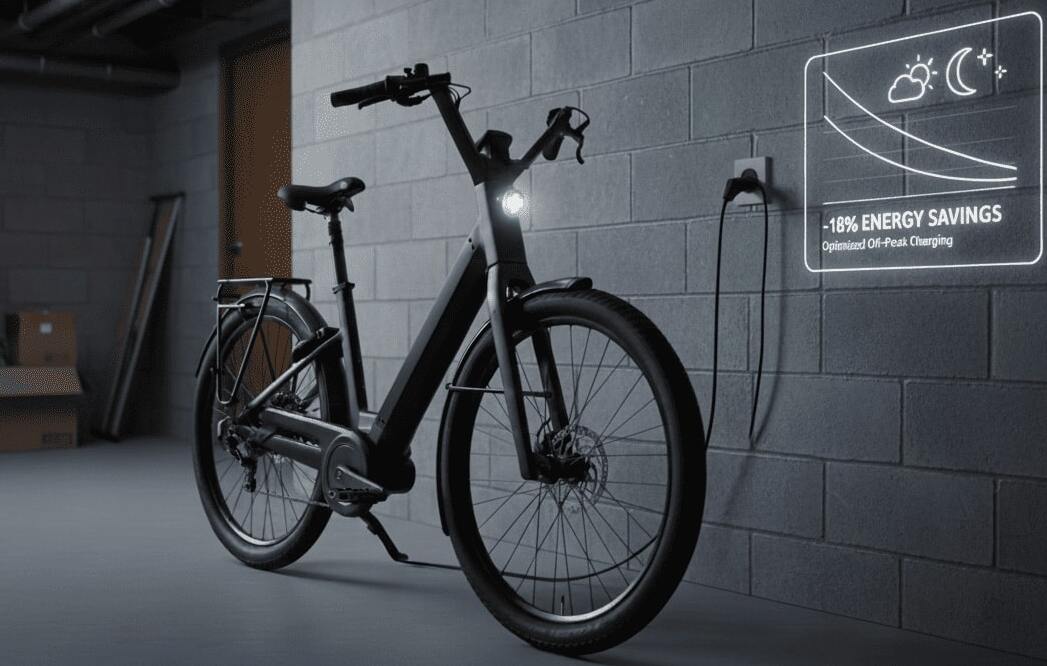
For charging, I mainly want something simple: charge at night preferentially (when it’s cheaper), and cut automatically when done. That way, I don’t leave a charger powered for nothing, and I still have control if I need to charge during the day.
Applied configuration:
- Smart plug dedicated to the charger
- Preferred schedule 11 pm → 7 am (off-peak hours)
- Automatic stop at end of charge, by monitoring the power drop (when consumption sustainably falls below a threshold)
Day to day, that’s exactly what I wanted: it optimizes the rate by default, and avoids charges that drag on unnecessarily… without forcing me to stick to an exact schedule.
🛡️ Safety: automatic cut-off to prevent forgotten appliances
Beyond savings, smart plugs give me peace of mind by securing at-risk appliances.
Hair straightener: automatic safety cut-off
A hair straightener, like a clothes iron, is a “risk” appliance: it gets very hot, sometimes used in a rush, and one forgotten moment can leave it powered. At best, you stress wondering if you switched it off. At worst, you leave a heat source active unattended.
The solution: automatic shut-off after 15 minutes
I installed a dedicated Tapo P110 plug in the bathroom (and the same principle works great for a clothes iron). The idea is simple: you turn it on when you need it, and the plug cuts automatically, no matter what.
Applied configuration:
- Plug off by default
- Manual turn-on via the physical button (no phone needed)
- Automatic cut-off after 15 minutes of operation
In practice, it changes everything: the appliance can no longer stay powered “by accident” for hours. You eliminate the “did I turn it off?” doubt and dramatically reduce the risk from prolonged heating. Bonus: no more unnecessary standby, and forgotten devices no longer cost money. It’s a simple, affordable safety automation that’s genuinely effective.
My feedback after 1 year:
This automation is the one that gives me the most peace of mind daily. Zero stress when leaving the house.
✅ Conclusion: measure before optimizing
After 1 year of use, I take away three simple lessons.
1) Measure before optimizing Without measurement, I would have spent time hunting 2W standby… while leaving my dehumidifiers running when they concentrated the main savings potential. Smart plugs have a superpower: they make visible what isn’t, and they allow prioritization without kidding yourself.
2) Automation removes mental load Switching off, cutting, thinking about off-peak hours, checking if “it’s still running”… all that disappears. Once set up, the system applies the rules on its own, every day, without fail. And that’s where home automation becomes truly useful: not when it goes “wow”, but when it frees your mind.
3) Safety is worth more than the bill The hair straightener (or iron) that cuts automatically after 15 minutes isn’t a gadget. It’s concrete peace of mind. And at home, that often outweighs a few euros saved.
In the end, with ~€60 invested in plugs (excluding optional sensor), I save €238 per year while gaining comfort and safety. With an ROI of around 3 months, it’s clearly one of my best smart home investments. If you’re hesitating, keep it simple: equip 2 or 3 “big suspects”, measure for 15 days, then automate what stands out. The numbers will do the rest.
❓ FAQ
Questions fréquentes
Do I need Home Assistant to save money with smart plugs?
Home Assistant becomes especially useful if you want smarter scenarios:
- Control the plug based on "external" sensors (not those from the brand): presence (PIR), door/window opening, temperature, humidity, light level, power consumption, etc.
- Trigger multi-condition rules (e.g. "if nobody home AND it's daytime, then cut X")
- Centralize all your devices (Wi-Fi, Zigbee, etc.) in one place.
Wi-Fi or Zigbee: what's the real difference for smart plugs?
- Wi-Fi: easy to install, no hub… but if you put many of them, it can load your Wi-Fi network and depends heavily on coverage quality.
- Zigbee: requires a Zigbee coordinator (key/dongle or compatible hub), but it's designed for home automation: mesh network, often more stable, and avoids adding devices to Wi-Fi.
Which appliances should I avoid cutting with a smart plug?
- Don't cut what must stay powered: router if it affects alarm, cameras, notifications, automations… also fridge/freezer, medical devices, etc.
- Respect the power rating: check the max current (often 16A) and avoid sustained "borderline" use. On a high-draw appliance, keep margin and monitor: if the plug gets abnormally hot, change strategy (or equipment).
How do I prevent the automation from cycling ON/OFF with a threshold (humidity, power, temperature…)?
- Use hysteresis (two thresholds): e.g. ON at 60% / OFF at 58%
- Add a minimum ON/OFF duration: e.g. "once on, leave it for 10 minutes"
- Require a sustained condition: e.g. "power < 5W for 3 minutes" before cutting (very useful for end of charge).